Level 1 — Timeline overview
Level 1 is a Gantt-style bar chart of every clip in the session on a shared time axis. It exists to give a one-glance sense of which MIDI files and camera clips were recorded when, and to provide the coarse-alignment control (the participant's global shift).
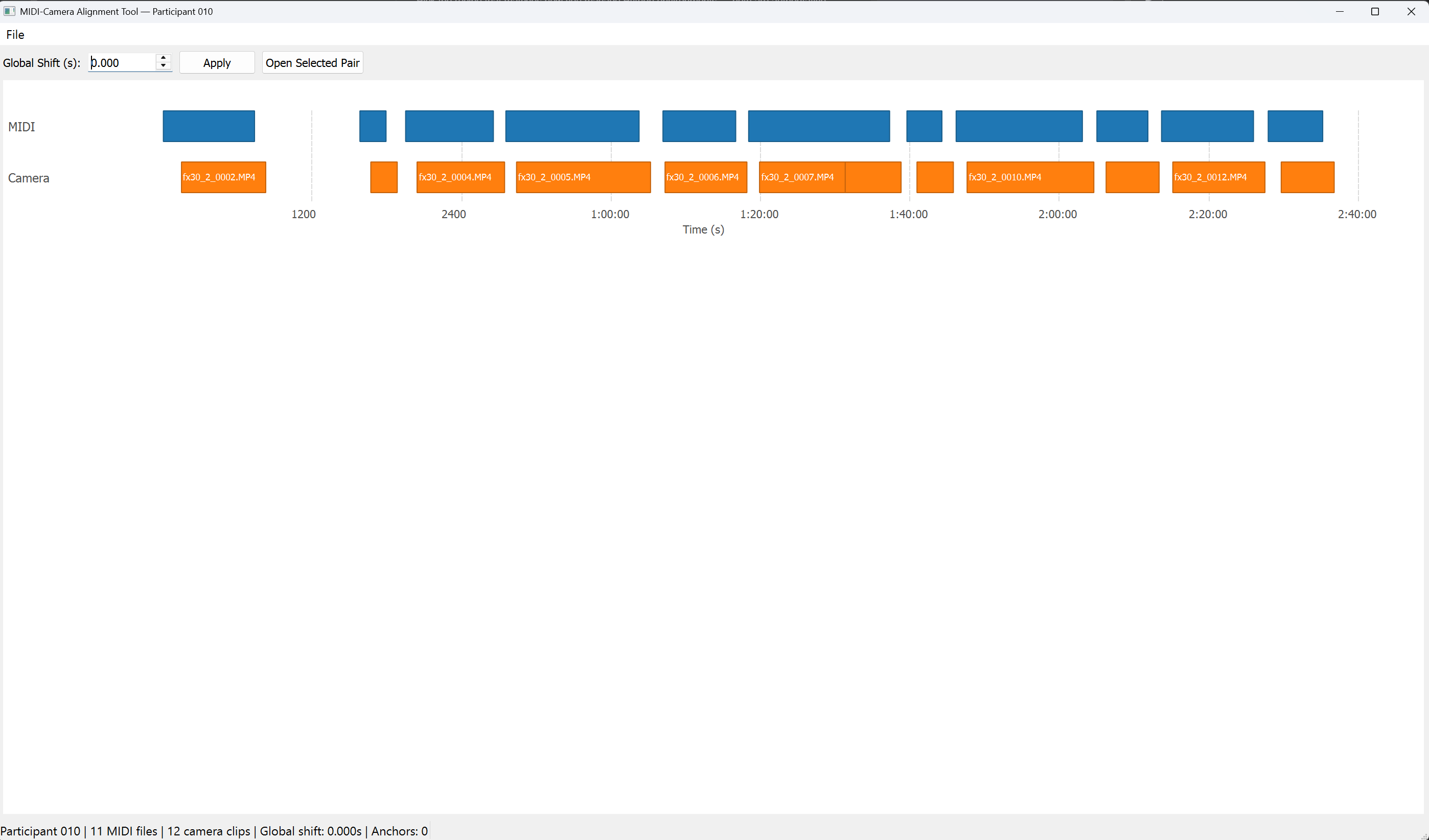
┌──────────────────────────────────────────────────────────────────┐
│ Global Shift (s): [ 0.000 ▲▼ ]  [ Apply ]  [ Open Selected Pair ]│
├──────────────────────────────────────────────────────────────────┤
│                                                                  │
│  MIDI      █████   ███████   ████       █████                    │
│                                                                  │
│  Camera         █████   ███████   ████       █████               │
│                                                                  │
│           0s    100s    200s    300s    400s    500s   Time (s)  │
└──────────────────────────────────────────────────────────────────┘
Blue bars are MIDI clips (top row). Orange bars are camera clips (bottom row). Each bar's length is proportional to the clip's duration. Filenames are printed inside each bar when there's room.
Global Shift controls (top row)
| Widget | Behaviour |
|---|---|
Global Shift (s) QDoubleSpinBox |
Range ±100000 s, 3 decimal places, single-step 0.1. Initial value is state.global_shift_seconds. Editing the value does not change state — you must click Apply. |
Apply QPushButton |
Calls AlignmentService.set_global_shift(value, clear_anchors_if_needed=False). If anchors exist, shows a Yes/No confirmation dialog ("N anchor(s) exist. Applying a new global shift will clear all anchors across all clips. Continue?"); on No, the spinbox is reverted to the current state value. On Yes, re-calls with clear_anchors_if_needed=True. On success, the canvas re-renders and state_modified is emitted (marks window dirty). |
Open Selected Pair QPushButton |
If both a MIDI bar and a camera bar are selected, emits pair_selected to drill into Level 2. Equivalent to double-clicking. |
Canvas interactions
| Input | Action |
|---|---|
| Left-click a blue (MIDI) bar | Toggle-select it. Clicking it again or clicking a different MIDI bar changes the selection. |
| Left-click an orange (camera) bar | Same, for the camera side. |
| Left-click empty space + drag | Pan the time view horizontally. |
| Hover over a bar | Tooltip with filename, duration, and unix start/end (plus capture FPS for camera). |
| Double-click anywhere (when both rows have a selection) | Emits pair_selected(midi_index, camera_index) → Level 2. |
| Mouse wheel | Zoom in (wheel up, factor 0.8) or out (wheel down, factor 1.25), centered on the cursor. |
Selection visual: a 2 px yellow border is drawn around the selected bar. Selection persists across panning and zooming; it is cleared only by clicking the same bar again or loading a new session.
Zoom limits
- Minimum viewport: 1 second — prevents accidental infinite-zoom.
- Maximum viewport: 100 000 seconds (~27 h).
If a zoom would exceed either limit the wheel event is silently ignored.
Grid
The background shows dashed vertical grid lines at "nice" intervals chosen from [1, 2, 5, 10, 20, 30, 60, 120, 300, 600, 1200, 1800, 3600] seconds, targeting about 10 ticks across the viewport. Tick labels use MM:SS or H:MM:SS above 1 h, plain seconds below.
What the bars reflect
- MIDI bars are drawn using
unix_startandunix_endstraight fromMidiFileInfo. - Camera bars are drawn using
raw_unix_start + effective_shift_for_camera(...)— the clip's wall-clock start with the current global shift (and any active anchor) applied. Changing the global shift immediately re-renders the camera row at its new alignment; MIDI bars stay put.
The tooltip on a camera bar distinguishes:
C0001.MP4
Duration: 450.1s
Raw start: 1707345678.9       ← from mtime, unshifted
Aligned start: 1707345740.2   ← after effective_shift
Capture FPS: 239.76
Returning from Level 2
Coming back from Level 2 (via Back, Esc, or Compute Global Shift finishing) refreshes the canvas in place. Selections survive the round trip. The spinbox value is re-synced to state.global_shift_seconds in case it was changed in Level 2.