Level 2 — Detail view¶
Level 2 is the per-pair alignment workspace. It shows a single MIDI file and a single camera clip side-by-side, plus supporting widgets for navigation, probing, and anchor management.
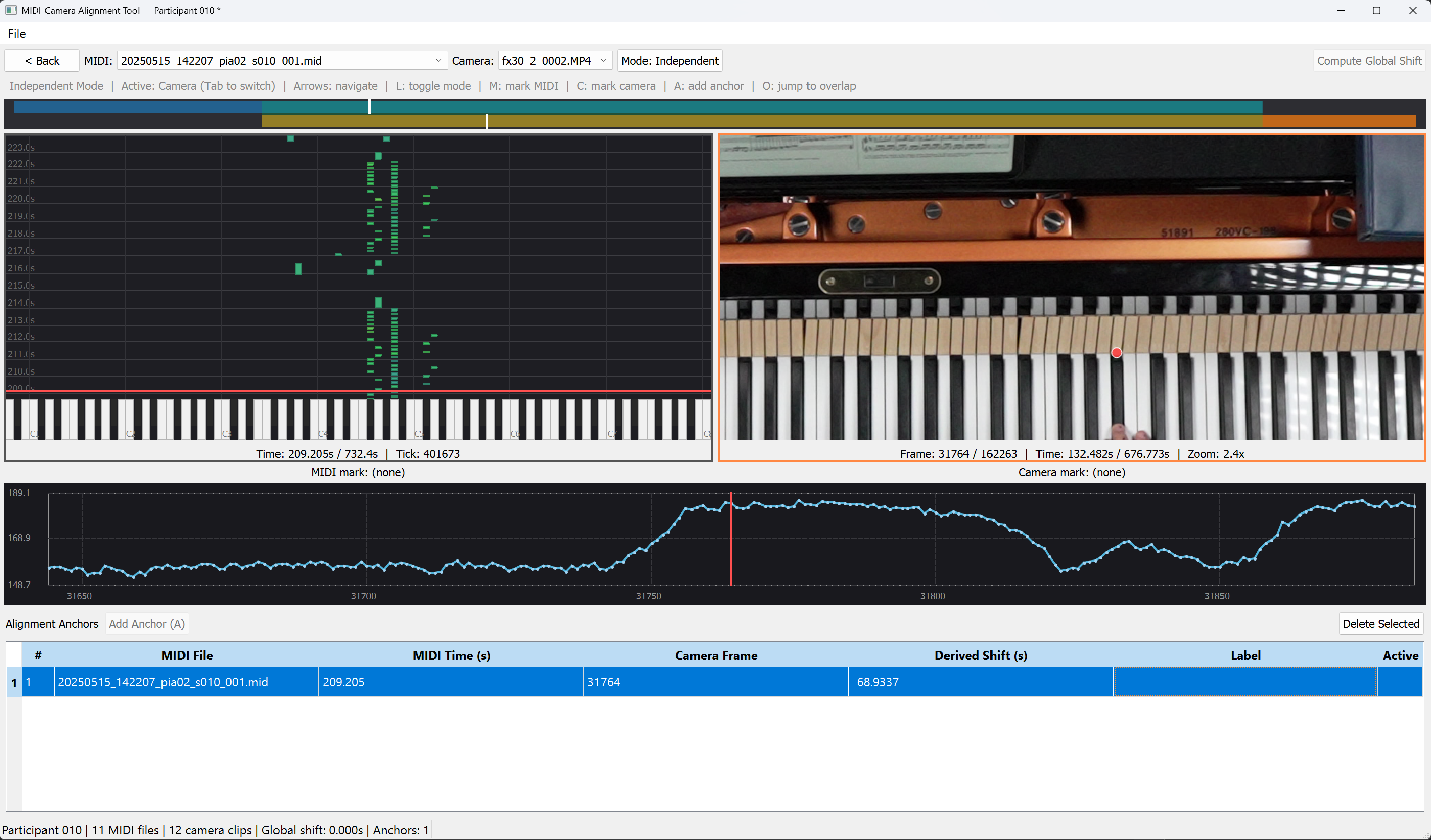
Layout¶
┌─────────────────────────────────────────────────────────────────────┐
│ [< Back] MIDI:[combo▾] Camera:[combo▾] [Mode: Independent]          │ ← top bar
│                                            [ Compute Global Shift ] │
├─────────────────────────────────────────────────────────────────────┤
│ Independent Mode | Active: Camera (Tab to switch) | Arrows: …       │ ← status hint line
├─────────────────────────────────────────────────────────────────────┤
│ ═══════════ Overlap indicator (30 px dual-track) ═══════════════════│ ← clickable nav bar
├─────────────────────────────┬───────────────────────────────────────┤
│                             │                                       │
│      MIDI panel             │         Camera panel                  │
│   (falling keys)            │     (video frame)                     │
│                             │                                       │
│   MIDI mark: (none)         │      Camera mark: (none)              │ ← marker labels
├─────────────────────────────┴───────────────────────────────────────┤
│ Intensity plot (fixed 120 px) — shows ±120 frames around probe dot  │
├─────────────────────────────────────────────────────────────────────┤
│ [Alignment Anchors] [Add Anchor (A)]           [Delete Selected]    │
│ # | MIDI File | MIDI Time | Camera Frame | Derived Shift | Label |* │ ← anchor table
└─────────────────────────────────────────────────────────────────────┘
Top bar¶
| Widget | Behaviour |
|---|---|
| < Back | Returns to Level 1. Clears the active anchor, drops the probe dot, and emits back_requested. Also bound to Esc. |
| MIDI: [combo] | Lists every MIDI file in the session. Changing the selection reloads the MIDI panel, clears the active anchor, and re-syncs if in Locked mode. |
| Camera: [combo] | Symmetric to the MIDI combo. Changing the selection reloads the camera panel, closes the old video, opens the intensity worker on the new clip, clears the active anchor, and re-syncs if in Locked mode. |
| Mode: Independent / Mode: Locked | Checkable button. Toggle behaviour is detailed in §5.9 Modes. Bound to L. |
| Compute Global Shift | Disabled until both markers are set. On click, runs the controller's compute_shift_from_markers, shows a Yes/No confirmation with the computed value, and applies it through AlignmentService.set_global_shift. If existing anchors would be invalidated, a second warning asks for confirmation. |
Tooltips on Compute Global Shift and Add Anchor (A) read "Set markers first: press M on MIDI panel, C on camera panel" when either button is disabled.
Status hint line¶
Single grey line below the top bar, refreshed on every mode change and active-panel switch:
Locked Mode | Active: MIDI (Tab to switch) | Arrows: navigate | L: toggle mode | M: mark MIDI | C: mark camera | A: add anchor | O: jump to overlap
Overlap indicator¶
Full-width, 30 px tall; see §5.6 Overlap indicator.
Main splitter¶
Horizontal QSplitter set to [500, 500] initially. Left column: MIDI panel with a "MIDI mark: …" label below. Right column: camera panel with a "Camera mark: …" label below.
An active panel indicator is drawn as a 2 px border around the currently-active panel:
- MIDI panel active → blue border (
#4488ff). - Camera panel active → orange border (
#ff8844). - Inactive panels get a grey (
#555) border.
A panel becomes "active" when the user clicks, wheels, or double-clicks within it, or via Tab, or when jumping to that panel via an anchor or overlap click. "Active" determines which panel the Left / Right / Shift+Left / Shift+Right arrow keys drive.
Marker labels¶
| State | Label text |
|---|---|
| No marker set | MIDI mark: (none) / Camera mark: (none) |
| Marker set | MIDI mark: trial_001.mid @ 12.456s / Camera mark: frame 2987 (12.467s) |
Pressing M / C replaces the current marker and triggers a 400 ms dark-blue flash on the label to confirm the keystroke registered.
Intensity plot¶
Fixed-height 120 px widget below the splitter; see §5.7 Intensity plot.
Anchor table¶
Fixed-max-height 200 px widget at the bottom; see §5.8 Anchor table. The header row includes an Add Anchor (A) button injected from Level 2 and a Delete Selected button.
Dialogs raised by Level 2¶
| Dialog | Trigger | Buttons |
|---|---|---|
| "Markers not set" warning | Computing shift or adding anchor with MarkersNotSetError |
OK |
| "Apply Global Shift: Computed X.XXXX s" | Clicking Compute Global Shift | Yes / No |
| "This will remove all N anchor(s). Continue?" | Computing a new shift when anchors exist | Yes / No (default No) |
| "Anchor Label" text input | Clicking Add Anchor (A) | OK / Cancel |
| "Unknown MIDI file" warning | Adding an anchor whose MIDI can't be found (should be unreachable in practice) | OK |
| "No Overlap" info | Pressing O when the clip pair doesn't overlap at the current shift | OK |
Cleanup¶
On Back, Esc, or closing the window, the Level 2 view:
- Clears the active anchor across all camera clips.
- Clears the probe dot (emitting
dot_clearedto clear the plot). - On full shutdown, closes the video capture and the intensity worker, then joins the intensity thread (up to 2 s).
A late intensity sample arriving after the clip has been swapped is discarded by a tuple-match filter (center_frame, src_x, src_y must still match the latest dropped dot), so a stale trace cannot overwrite the current plot.